

Powerful low-code process automation
With the ease and power of Nintex K2 Cloud and Nintex K2 Five, you can drive process excellence across your organization by connecting people, systems, and data to orchestrate how and when work gets done.
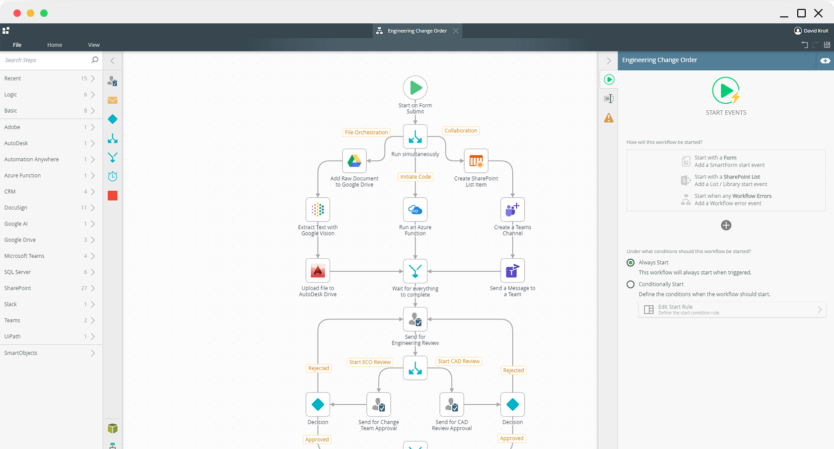

Manage the flow of work
Visually create workflows to handle both structured and unstructured processes, no matter the complexity.

Remove data silos
Integrate existing systems and tools into your applications to connect with the data you need to make better decisions.

Automation at scale
Solve automation challenges across your entire organization leveraging a single platform that was built to scale.
Automate simple to complex processes
Visually design workflows on Nintex K2 Cloud using patterns such as serial or parallel flows, rework, looping, and more. Incorporate powerful business logic rules, integrate your workflow with any line-of-business systems, and give your users a centralized view of their assigned tasks so work can flow more efficiently.
Build intuitive digital form experiences
Using K2 Software’s feature-rich designer, create and connect SmartForms to your workflows and line-of-business data to design a powerful user experience. Build a form once and reuse them across any application. Incorporate business rules for data validation and dynamic display logic. You can even combine voice, chatbots, and social channels into your forms to create a seamless, interactive experience for your users.
Easily connect data with your apps
K2 Software’s patented SmartObject framework enables you to connect to virtually any line-of-business system with no code using pre-built connectors – or create your own using a Javascript-based custom broker. Whether your data resides in the cloud or on-premises, you can create an integration point once and reuse it across all your workflows, forms, and reports.
Improve visibility with built-in reporting
Leverage K2 Software’s reporting and analytics tools to track and improve your applications with real-time process insight and performance metrics. Out-of-the-box and customizable reports and dashboards provide key metrics into process health. Nintex K2 Cloud also allows you to connect to third-party analytics tools like PowerBI and Tableau to create powerful business intelligence solutions.
Recent automation on-prem resources
Customer stories
Companies around the globe are using Nintex on different kinds of projects