Home : Company : K2 workflow for SharePoint


K2 workflow for SharePoint

Envision efficiency. Then make it happen.
K2 unlocks the power of SharePoint 2010 by providing graphical tools that eliminate code and make it easier to automate business processes and workflows in SharePoint. Start with lists and libraries, then use K2 to quickly build SharePoint forms and application logic that drives your business processes.

Watch the K2 workflow for SharePoint video
What is K2?
Download the K2 workflow for SharePoint brochure
Customer Evidence
Multiple, Graphical Process Designers
Better Processes
Reporting Capabilities and Great Visibility

K2 makes software that automates business processes to increase efficiency and reduce costs for companies all over the world. Our solutions — built on top of the Microsoft platform — fit the unique needs of each business that uses K2.

WORKFLOW
On its most basic level, this involves routing documents and tasks electronically between people and systems. People can access their tasks in a Web-based task list on their laptop or mobile. Workflows save time, save paper, reduce errors and provide some level of visibility.

Examples: Contract approval, vacation requests, Web content publishing

BPM
Often uses workflow as a foundation, but expands dimensions and capabilities

  • More complex scenarios
  • Use information from multiple systems
  • Great visibility and reporting
  • Flexibility to change and improve

Examples: Procurement, customer service, inventory control

PROCESS-DRIVEN APPLICATIONS
All the components of workflow and all the components of BPM are present, but there's more. Process-driven applications bring together processes, people, services, information and systems — simply, without unnecessary complexity. They are flexible, scalable and reusable.

Examples: Case management, HR onboarding, project lifecycle management.

K2 makes software that automates business processes to increase efficiency and reduce costs for companies all over the world. Our solutions — built on top of the Microsoft platform — fit the unique needs of each business that uses K2.

WORKFLOW
On its most basic level, this involves routing documents and tasks electronically between people and systems. People can access their tasks in a Web-based task list on their laptop or mobile. Workflows save time, save paper, reduce errors and provide some level of visibility.

Examples: Contract approval, vacation requests, Web content publishing

BPM
Often uses workflow as a foundation, but expands dimensions and capabilities

  • More complex scenarios
  • Use information from multiple systems
  • Great visibility and reporting
  • Flexibility to change and improve

Examples: Procurement, customer service, inventory control

PROCESS-DRIVEN APPLICATIONS
All the components of workflow and all the components of BPM are present, but there's more. Process-driven applications bring together processes, people, services, information and systems — simply, without unnecessary complexity. They are flexible, scalable and reusable.

Examples: Case management, HR onboarding, project lifecycle management.


K2 offers visual tools for powerful solutions that span all kinds of business processes in SharePoint - contract management, financial processes, document management and audit, leave requests, SharePoint site lifecycle management, and more.
K2 reduces workload, improves efficiency and ensures your organization is getting the most out of your SharePoint investment.
"Our business was looking for automation and greater efficiency within SharePoint...The sophistication and simplicity of the K2 design tools allow Omnicom Media Group to take an idea about streamlining a process and make it reality in a matter of days."
- KENNETH CORRIVEAU, SVP/CIO, OMNICOM MEDIA GROUP
MULTIPLE, GRAPHICAL PROCESS DESIGNERS
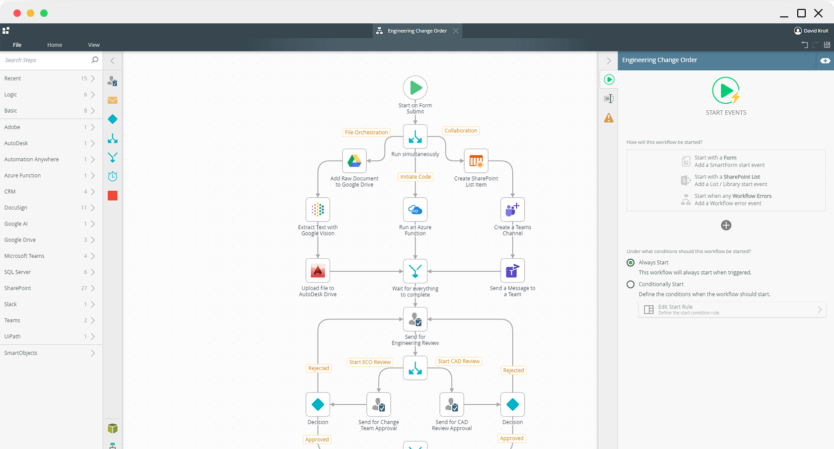
K2 provides three different workflow design canvases, providing the tools necessary to make anyone in your organization a process modeller, regardless of their technical expertise.
K2 Designer for SharePointWatch Video
An alternative to SharePoint Designer, the K2 Designer for SharePoint provides a graphical interface for designing workflows for SharePoint assets like lists, libraries and sites. Empower your end-users to build their own workflow solutions, freeing your IT department up to work on other applications.
Image
Image
K2 Studio
K2 Studio provides a standalone design canvas for business analysts and power users to model workflows and processes in a graphical environment. Process designers can model end-to-end solutions that integrate with SharePoint as well as other line-of-business systems.

Image
K2 Designer for Visual Studio
K2 Designer for Visual Studio is a powerful extension to Visual Studio that provides access to wizards, business logic and routing capabilities needed to build K2 solutions, along with familiar Visual Studio capabilities, like source control and debugging tools.
For a full list of features visit K2 blackpearl and K2 blackpoint Back to the top

BETTER PROCESSES
Use K2's powerful capabilities to build SharePoint workflow and business process solutions that are easy to use and that make your business run more efficiently.
Image
Inline Functions for Business LogicWatch Video
K2 Inline Functions perform calculations and text formatting as part of your process and can be saved for reuse or extended to support your organization's unique needs.
Line-of-Business Integration
In the real world, business processes are not constrained to interacting with just one system and often need to span multiple line-of-business systems. With K2 SmartObjects, you have the flexibility to build workflow solutions that interact with any number of systems, all without the need for your process modellers to know how to code or even be experts in the backend systems.
Escalation, Redirection and Out-of-Office
K2 ensures that deadlines are always met because the process can automatically send the pending task to another employee when no action has been taken. And with the K2 Out-of-Office capabilities, employees can specify alternate users who can complete work while they are out of the office, ensuring that tasks are always completed on-time.
Image
Multiple Task Interfaces
K2 enables your users to work efficiently by giving them access to multiple interfaces to access their tasks. Features such as the global K2 Tasklist, mobile applications, email-enabled task completion and integration with common forms technologies like InfoPath allow users to complete their work no matter where they are.
For a full list of features visit K2 blackpearl and K2 blackpoint Back to the top

REPORTING CAPABILITIES AND GREAT VISIBILITY
All-around visibility is critical for every business. Making that information incredibly easy to access and understand is where K2 delivers professional-grade power.
K2 View FlowWatch Video
K2 View Flow offers a real-time, graphical representation of a running K2 workflow so that business users and administrators have insight into the status of any process, at any time. Access to the decisions made, the people involved and the time it takes to complete each task allows you to make sure your business processes are running efficiently.
Image
Full visibility with K2 Process Portals
K2 Process Portals, created as a site in your SharePoint environment, provide process insight that allows you to determine the overall performance of your SharePoint workflows. With K2 Process Portals and the sophisticated set of available reports, technical and non-technical employees can now benchmark people and workflows 24/7.
For a full list of features visit K2 blackpearl and K2 blackpoint Back to the top

CUSTOMER EVIDENCE
Features and functions are important, but the real value of K2 is manifested in the solutions our customers are using. K2 continues to deliver value for organizations looking to improve efficiency in business processes and workflow solutions.
Image ARMITRON
Armitron uses K2 to maximize business process efficiency for several reports and data-entry review tasks that include complex requirements that could not be handled by the out-of-the-box SharePoint workflow capabilities alone.
Image EMERSON NETWORK POWER ASIA
Emerson Network Power Asia paired K2 with SharePoint to automate mission-critical processes, resulting in time-savings and increased visibility across the entire organization.
Image CITY OF CHARLOTTE
City of Charlotte chose K2 to automate their critical processes like an employee helpdesk system, because of K2's ease of use and deep integration with their existing SharePoint environment.
Image AUSTRALIAN AMALGAMATED TERMINALS
Australian Amalgamated Terminals (AAT) improved efficiency in many of their critical business applications, including their incident and claims management systems, with solutions built using K2 and SharePoint.
Back to the top