Feature Highlights Evaluate | | | | | |
 |
| Visual Designers |
 |
| Research shows that it's critical to have end-user involvement in process improvement. Business analysts, subject matter experts and IT developers can all make significant contributions to the creation and viability of a final solution. K2 understands the importance of collaboration and provides design environments for all types of users, regardless of their technical expertise. |
 |
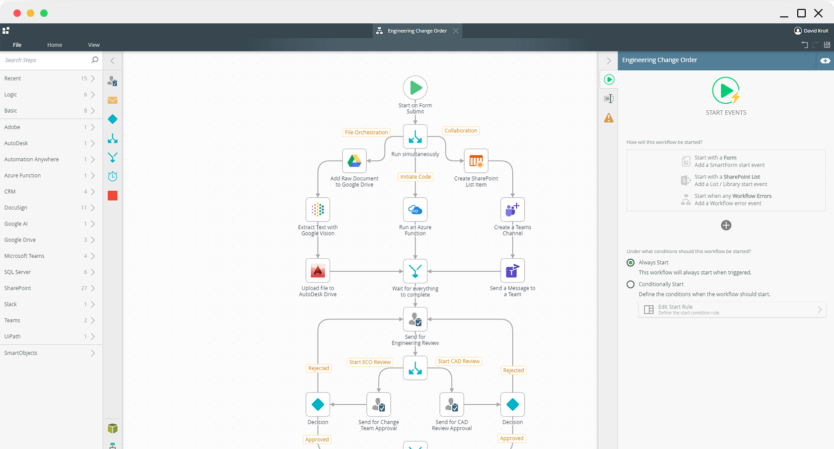
K2 Designer for SharePoint Your team is using SharePoint to maintain all the product collateral being produced by your company, but you need a robust process for approving and publishing the content to the right place. With the K2 Designer for SharePoint, you have access to a Web-based environment that makes it easy to create a process that meets your needs.
K2 Studio Your company needs to build a centralized employee review solution that reaches across multiple systems to gather relevant employee data. With K2 Studio, a no-code, Office-like designer, you have the tools you need (like access to Web services) to build applications that pull information from your finance system and your HR database, without having to write code.
|
Extensibility IT Asset Management is a major pain point in your company. K2 provides your developers with the ability to build business logic, as an Inline Function, for retrieving asset information from a custom inventory database, which can then be accessed by the analyst building an asset tracking system. Any K2 designer can be extended by adding domain-specific functions and/or workflow steps to the existing set of tools.
Collaboration across the board You need to provide your company's portfolio managers with greater control and a clear audit trail in the processes they use every day. K2 allows those portfolio managers to start building the process in K2 Designer for SharePoint and then hand it off to IT to complete the technical steps using K2 Studio.
|
 |
| Back to the top |
 |
|
 |
| Business Logic |
 |
| Every organization has processes, like employee onboarding, that include unique business logic aimed at triggering chains of decision-making events. Managing these rules and policies within your processes can be difficult without the right tools. K2 understands the importance of business logic, so we give you a wide range of features to ensure the solutions you build solve your problems perfectly. |
 |
Inline Functions for Business Logic When your manager gets that e-mail to approve your vaction request, she needs to know how many vacation days you have left, and the dates need to be formatted correctly so she knows you'll be gone March 10, not Oct. 3. K2 Inline Functions will perform calculations and text formatting as part of your process and can be saved for reuse, all without writing code.
|
 |
Escalation and Redirection Missing deadlines can prove costly. That new banner for your big tradeshow next month needs to be approved by the communications director who's on a month-long holiday. With K2-based solutions, deadlines are always met because the process can automatically send the pending task to another employee when no action has been taken.
Working Hours and Time Zone Capabilities With K2, your employees can configure their working hours and the time zone they're in so that tasks can be routed to them during business hours instead of in the middle of the night. This is particularly useful in organizations that run 24-hour help desks, so that customer tickets can be routed to any available team member for quick resolution.
|
 |
Notifications Use automatic notifications to make your process participants aware of outstanding tasks, like expense approvals. Even better, the K2 Event Bus feature lets users set up customized notifications that are sent based on specific events, like when the price of materials drops to a certain level and it’s time to act.
Excel and Word Inline Functions K2 continues to invest in powerful Inline Functions that deliver a whole new level of capabilities for the enterprise. Companies that deal with ever-changing policies and legislation often keep critical data and calculations in Office documents. K2 lets you maintain your business logic in existing Word documents and Excel spreadsheets and then use that information as part of the business logic or to simply provide information to your end users.
|
 |
| Back to the top |
 |
|
 |
| Task Management |
 |
| Your employees want a clear view of what needs to be done and when it needs to be completed. They want tasks that are easy to access and act upon, and they don't want to learn new, complicated systems. K2 has the answer. |
 |
Task Central — The K2 Worklist It's easier to keep track of everything if it's all in one place. The K2 Worklist provides users with a single view of all their assigned tasks, across all processes in the K2 environment. Users can modify and complete these tasks directly from the Worklist — a personalized to-do list, only better.
|
 |
Support for Mobile Devices   With the K2 mobile Task List, available for iPhone and Blackberry devices, rest assured that your critical leave request will be approved quickly, even when your manager is on a business trip.
K2 Process Web Parts The help desk just told you they can't find the ticket you submitted almost six weeks ago, and you'll have to resubmit the request. With K2's improved process web parts you can see exactly when you submitted the ticket and who it's currently assigned to - no resubmission needed. K2 process web parts show you details of all process requests you've submitted and requests you're currently working on. The data can be filtered on criteria like submission date, process name and current status.
|
 |
| Back to the top |
 |
|
 |
| Reporting and Auditing |
 |
| All-around visibility is critical for every business. Making that information incredibly easy to access and understand is where K2 delivers professional-grade power. |
 |
K2 View Flow  Your helpdesk system for new hires, terminations and transfers is working well; and you know this because K2 View Flow provides a graphical, real-time view into the status of your processes. For every action taken along the workflow path, audit information is available, so users know what decisions were made and who made them.
Full visibility with K2 Process Portals Your customer support system directly contributes to customer satisfaction and impacts renewed sales, so keeping turnaround time down is critical. K2 reports, available in the K2 Process Portal, provide process insight that allows you to determine the overall performance of the support department or a single individual. With K2 Process Portals and the sophisticated set of available reports, technical and non-technical employees can now benchmark people and workflows 24/7.
|
 |
| Back to the top |
 |
|
 |
| Administration and Process Management |
 |
| Manage and maintain your K2-based solutions in a familiar, comfortable environment like SharePoint or a web-based application. K2 administration is the gateway to managing and performing the everyday K2-based administrator tasks. |
 |
K2 Process Scheduler With K2's process scheduler, recurring processes, like monthly sales forecasting, can be set to automatically start on the first Tuesday of each month, for example, ensuring that you'll never miss a deadline again.
Administrative process approval The marketing team at your business has created a new process to approve and manage content published to your company's Web site, but instead of updating the content, the process is set to delete everything. Luckily, with K2's process approval functionality, you'll catch the mistake and fix the problem before the process goes live. Feel comfortable letting business users create their own processes, knowing you'll have a chance to check them before they go live.
|
 |
Version management You have implemented a new version of a K2-based solution to automate the delivery of Web- and print-based content, but unfortunately it contains an error. Luckily, with K2's version management, if a mistake is found in a process that has already been deployed, an administrator can easily move back to a previous version of the process until the error can be fixed and the process re-published.
|
 |
K2 Process Management tools Your management team decided that all new customer onboarding requests need to be approved by a sales manager and the finance department. K2 gives you the tools to update a process with new requirements even after it has been deployed and is running in your production environment.
Flexible process and task security options K2 provides the ability to set rights both at the process level as well as at the action-level so that sensitive tasks and information — like employee reviews and salary information — are only seen by the right people as part of a relevant process.
|
 |
Multiple Authentication Methods Whether you're using Kerberos in your environment or not, K2 provides multiple authentication methods to ensure your users can access tasks and process information easily and efficiently, without a lot of additional configuration steps.
|
 |
| Back to the top |
|
 |
| Take a closer look |
| You know the basics, now use the tools below for more in-depth information and experiences with K2 blackpoint 4.5 |
 |
 |
Download additional information - If you need more information, take a look at our K2 blackpoint Product Overview. |
 |
 |
Request a demo - Contact us to request a comprehensive demo of our K2 blackpoint software |
 |
 |
Try it now - Access the K2 Try Now environment to evaluate the K2 platform in a browser-based environment configured with some of the most popular K2 features. |
 |
 |
Learn about SharePoint 2010 support - Take a look at our SharePoint 2010 information to learn more. |
 |
  |
Read the EULA - Get details about the end-user license agreement for K2 blackpoint. |
|
| | | | | |
|